Before you start — check you're allowed
If your GitHub account comes from your employer, an admin may have locked some of this down. Two minutes here saves a confusing dead end later.
You need three things switched on for your repo:
1. GitHub Actions enabled — check Settings ▸ Actions ▸ General.
If you see "Actions permissions" options, it's available. If the whole page is missing or greyed out,
your org has disabled it.
2. Permission to add a repository secret — you need admin on the repo (or someone
who has it). Only needed if you bring your own license — until 31 October 2026 there is no
secret at all.
3. (Optional) GitHub Advanced Security — only needed if you want findings in the
Security tab on a private repo. The pull-request comment works without it.
If any of those are blocked — what to ask your admin
Send your GitHub org administrator this:
"Please enable GitHub Actions for <repo>.
I'm adding a CI check (CodeDelta) that runs inside our own runners — no code leaves our GitHub
account, and it needs no secrets or credentials at all."
The three steps
Everything below happens in your browser, on github.com. Until 31 October 2026 the licence is built into the Action — no secret, no signup — the Action runs fully unlocked out of the box. Bringing your own license is covered further down.
-
Create the workflow file
Still on GitHub, click the Add file ▸ Create new file button on your repo's main page. In the filename box, type this exact path (the slashes create the folders for you):
.github/workflows/codedelta.ymlThen paste this into the file body:
# .github/workflows/codedelta.yml name: CodeDelta on: [pull_request] permissions: contents: read pull-requests: write # post the summary comment security-events: write # SARIF to the Security tab (public repo or Advanced Security) jobs: codedelta: runs-on: ubuntu-latest steps: - uses: actions/checkout@v4 with: { fetch-depth: 0 } - uses: code-delta-app/action@v1 with: mode: churn_agentClick Commit changes. You've just told GitHub: "on every pull request, run CodeDelta." The free licence is built into the Action.
-
Open a pull request to trigger it
Make any small change on a branch and open a pull request. GitHub automatically starts a throwaway Linux machine, downloads the CodeDelta engine, scans the changed code, and reports back. You can watch it live in the Actions tab.
Prefer to run it on demand instead of on every PR? See the run-it-without-the-PR-gate options (a manual button, or a nightly schedule).
-
Read the result on the pull request
Within a minute, a comment from CodeDelta appears on the pull request — a churn summary plus any AI/agent findings, right where reviewers already look. Full HTML reports are saved as build artifacts, and (if enabled) findings show in the Security tab.
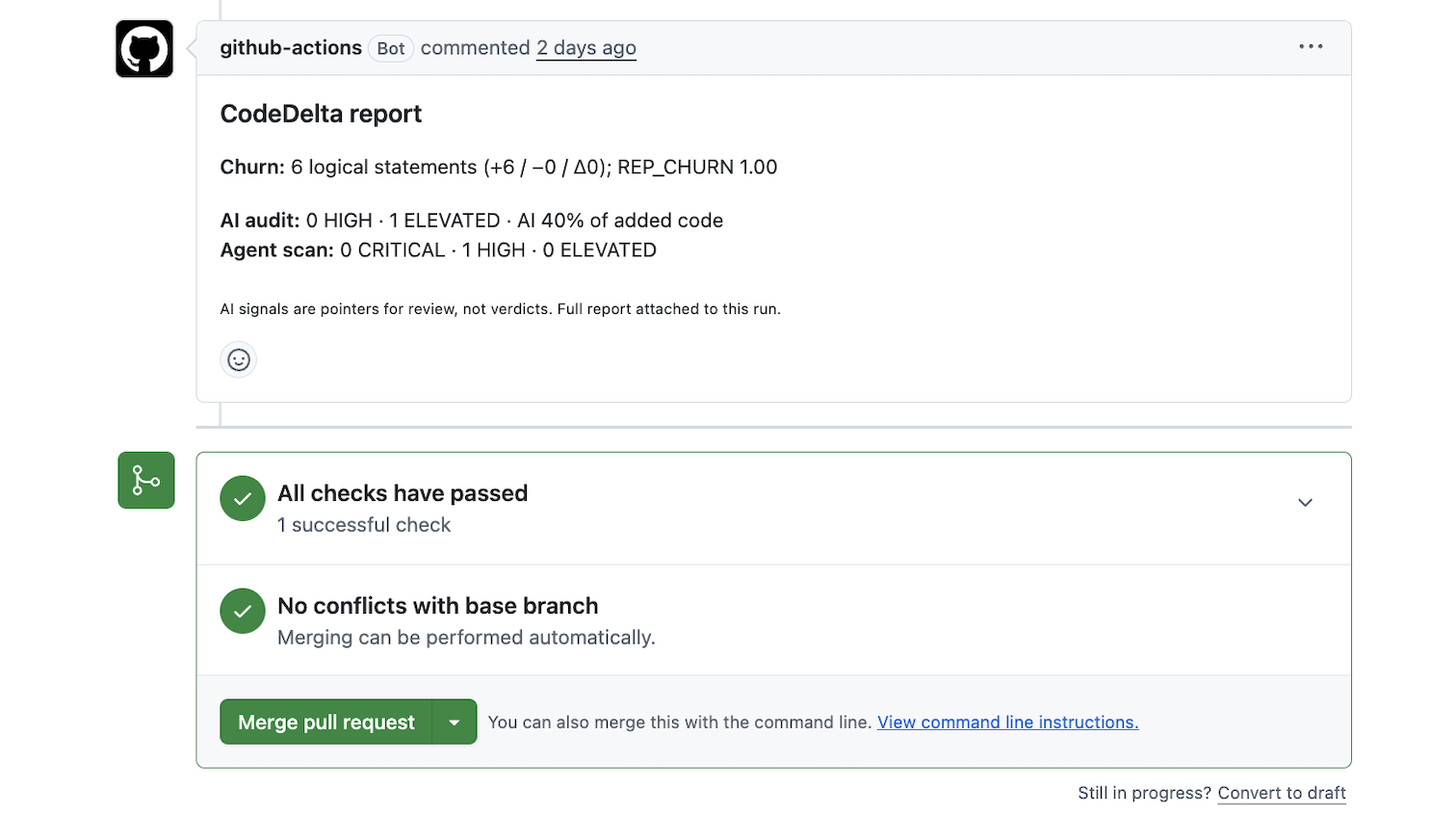
That's it — it now runs on every pull request, with nothing installed on anyone's machine.
Bringing your own license
Until 31 October 2026 you can skip this section entirely. To keep running past that date — or to use your own license sooner — add it as a secret; it overrides the built-in license automatically.
-
Get your license and copy it as text
CodeDelta needs a license file (
codedelta.lic). If you don't have one yet, request one and we'll send it.A GitHub secret stores text, so convert the file to one line of base64 first. On macOS or Linux, open Terminal and run:
# macOS / Linux — copies the encoded license to your clipboard base64 -i codedelta.lic | pbcopy # macOS base64 -w0 codedelta.lic # Linux (then copy the output)On Windows, run in PowerShell:
[Convert]::ToBase64String([IO.File]::ReadAllBytes("codedelta.lic")) | Set-ClipboardYou now have the license as one long line of text on your clipboard.
-
Add it as a repository secret
In your repository on GitHub, go to:
Settings ▸ Secrets and variables ▸ Actions ▸ New repository secret
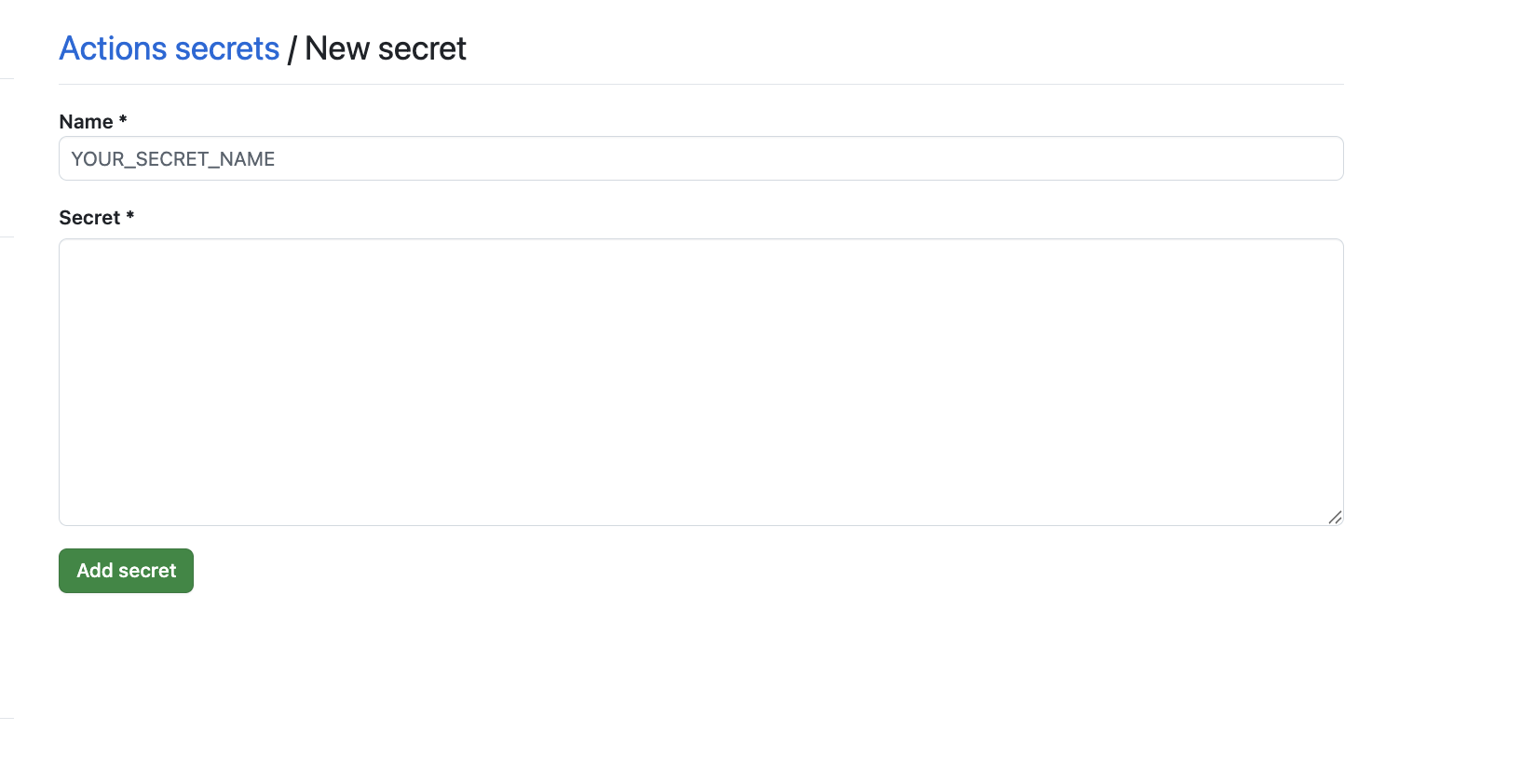
Set the Name to
CODEDELTA_LICENSE, paste the base64 text into Secret, and click Add secret. That's the only secret you'll need.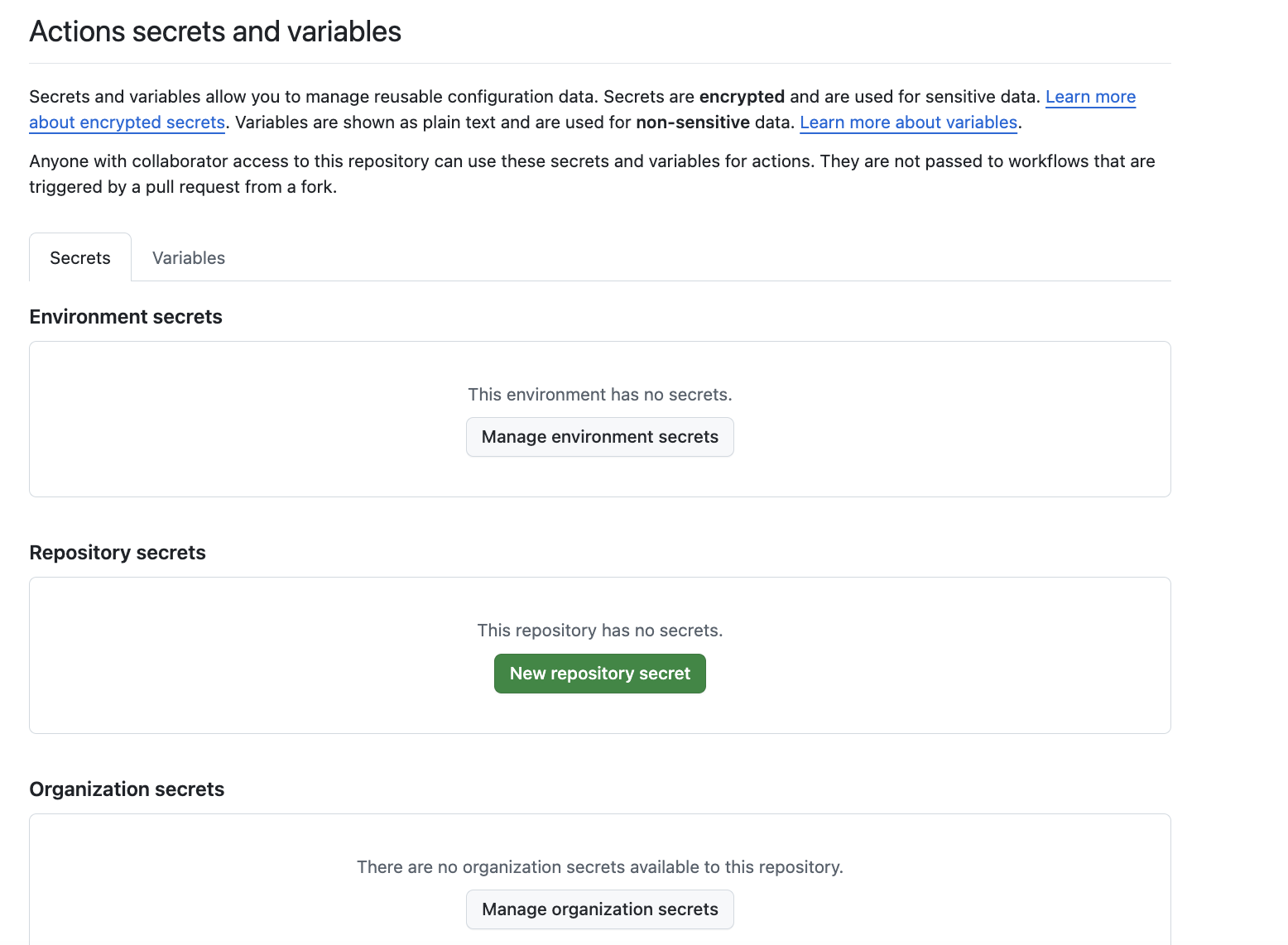
-
Point the workflow at it
Edit
.github/workflows/codedelta.ymland add one line underwith::license: ${{ secrets.CODEDELTA_LICENSE }}From the next pull request, your own license is used instead of the built-in one.
No-install alternatives
The pull-request Action above is the common path. If it doesn't fit, these run CodeDelta without installing anything either — full details on the CLI / CI page.
- On-demand / scheduled — run from the Actions tab manually, or nightly on a cron, with no pull-request coupling.
- Docker container —
docker run ghcr.io/code-delta-app/codedelta scan …on any machine or runner that has Docker. - Codespaces — open the repo in a Codespace and run
codedeltain the browser terminal; it runs on your own GitHub account's compute.
Something not working?
The most common snags — "Actions is disabled," "I can't add a secret," "I see no comment," costs, and whether your code is uploaded — are answered in the GitHub integration FAQ.
Get the Action
The published Action and setup details live in the CodeDelta GitHub org. Free to evaluate, fully unlocked, until 31 October 2026 — the licence is built into the Action.
Try CodeDelta →